
A Complete Buyer's Guide to Making a Smart Purchase
Buying a used Tesla can be an excellent way to experience electric vehicle (EV) ownership at a lower price. Tesla vehicles are known for their advanced technology, impressive range, and over-the-air software updates. However, purchasing a used Tesla requires more than a standard used car inspection.
Unlike conventional vehicles, a Tesla's battery health, software features, charging history, and warranty status can significantly impact its value and long-term ownership costs.
This guide explains what to check before buying a used Tesla so you can make an informed decision.
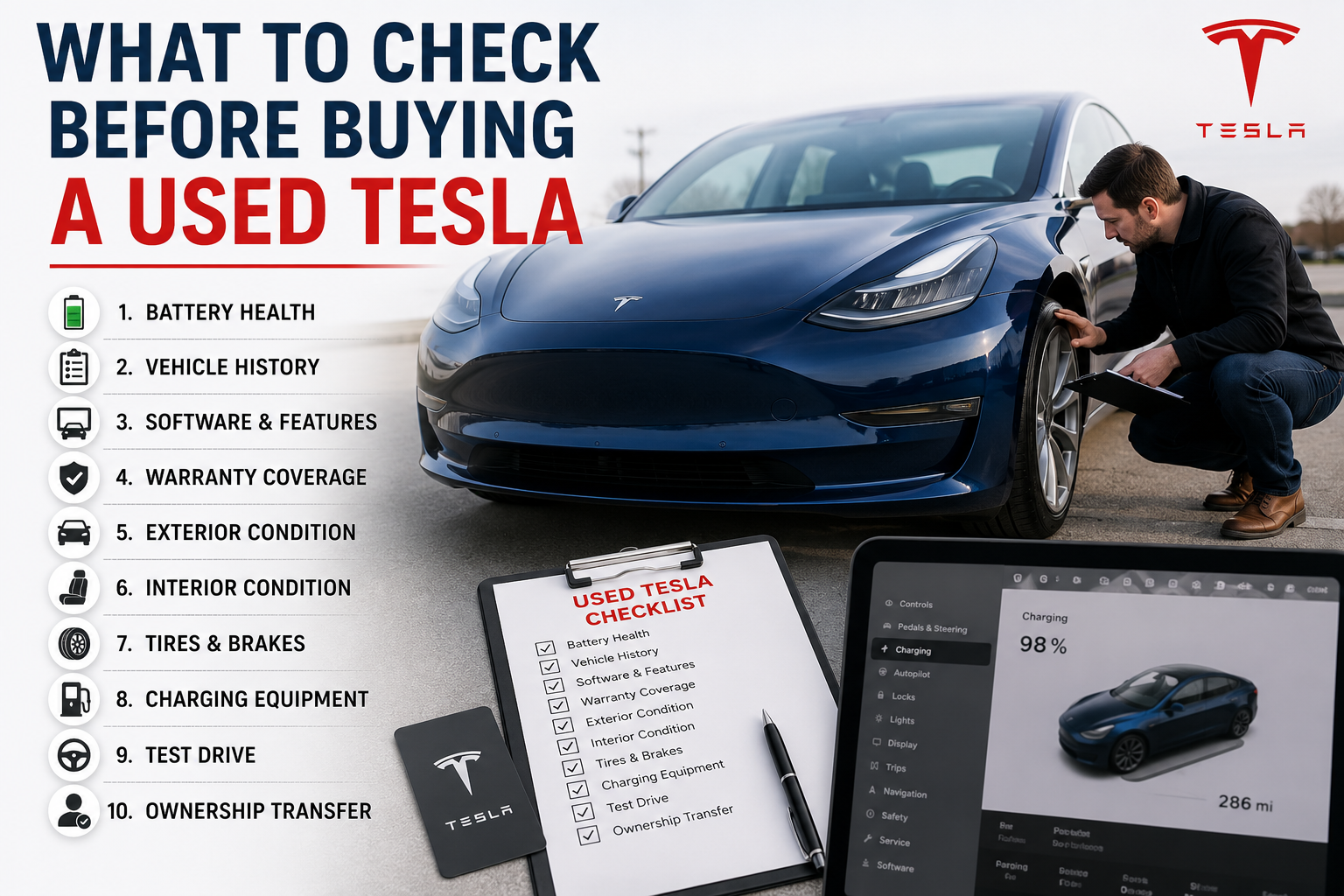
1. Verify the Vehicle History Report
Before inspecting the car, obtain a comprehensive vehicle history report.
Look for:
-
Previous accidents
-
Flood or fire damage
-
Salvage or rebuilt title
-
Number of previous owners
-
Odometer readings
-
Service history
-
Outstanding recalls
A clean history report doesn't guarantee the vehicle is perfect, but it helps identify potential red flags.
2. Check Battery Health
The battery is the most expensive component in a Tesla.
Ask the seller about:
-
Current estimated driving range at 100% charge
-
Any battery repairs or replacements
-
Charging habits
-
Frequency of Supercharging
Signs of a Healthy Battery
-
Range close to Tesla's original estimate
-
Consistent charging performance
-
No battery warning messages
-
Smooth energy usage
Battery degradation is normal over time, but excessive loss may indicate heavy usage or poor maintenance.
3. Inspect Charging Equipment
Ensure the vehicle includes:
-
Mobile Connector
-
Charging cable
-
Charging adapters
-
Home charging accessories (if included)
Replacing missing charging equipment can add to your ownership costs.
4. Confirm Software Features
Tesla vehicles are heavily software-driven.
Some premium features may not transfer with ownership.
Ask whether the vehicle includes:
-
Full Self-Driving (FSD)
-
Enhanced Autopilot
-
Premium Connectivity
-
Acceleration Boost
-
Heated rear seats (where applicable)
Verify these features directly in the vehicle's software settings.
5. Check Warranty Coverage
Tesla offers warranties that may still apply.
Review:
-
Basic Vehicle Limited Warranty
-
Battery Warranty
-
Drive Unit Warranty
Ask the seller for documentation and verify warranty eligibility using the Vehicle Identification Number (VIN).
Knowing how much warranty remains can help reduce unexpected repair expenses.
6. Inspect the Exterior
Walk around the vehicle carefully.
Look for:
-
Paint inconsistencies
-
Body panel gaps
-
Scratches
-
Dents
-
Windshield chips
-
Wheel damage
-
Tire wear
Although Teslas are known for minimalist design, uneven panel alignment or poor paint repairs may indicate previous collision damage.
7. Examine the Tires
Electric vehicles place greater torque on tires than many gasoline-powered cars.
Check for:
-
Uneven tread wear
-
Tire age
-
Matching tire brands
-
Sidewall damage
Replacing four EV-rated tires can be a significant expense, so it's worth factoring into your budget.
8. Test the Brakes
Because Teslas use regenerative braking, traditional brakes may see less wear—but they still need inspection.
Listen for:
-
Grinding noises
-
Vibrations
-
Brake warning lights
Also check brake rotors for corrosion, especially if the vehicle has spent time in snowy or coastal regions.
9. Test All Electronics
Tesla's touchscreen controls most vehicle functions.
During your inspection, test:
-
Touchscreen responsiveness
-
Navigation
-
Bluetooth
-
Cameras
-
Parking sensors
-
Climate control
-
Seat adjustments
-
Power windows
-
USB ports
-
Wireless charging pad (if equipped)
Ensure software menus function smoothly without freezing.
10. Inspect the Interior
Look for signs of excessive wear.
Check:
-
Seat upholstery
-
Steering wheel
-
Center console
-
Floor mats
-
Headliner
-
Dashboard
-
Door panels
A well-maintained interior often reflects careful ownership.
11. Take a Test Drive
A test drive reveals issues that may not be visible while parked.
During the drive, evaluate:
-
Smooth acceleration
-
Steering response
-
Suspension comfort
-
Regenerative braking
-
Cabin noise
-
Warning lights
-
Display alerts
Listen for unusual sounds over bumps or during turns.
12. Verify Charging Performance
If possible, connect the vehicle to a charger.
Observe:
-
Charging speed
-
Charging port condition
-
Charging interruptions
-
Error messages
Charging problems can indicate battery or hardware issues.
13. Check the VIN
Use the Vehicle Identification Number (VIN) to confirm:
-
Vehicle specifications
-
Manufacturing year
-
Warranty information
-
Recall history
Ensure the VIN on the dashboard matches the registration documents.
14. Ask About Service History
Tesla vehicles generally require less maintenance than gasoline cars, but service records are still valuable.
Ask about:
-
Tire rotations
-
Brake service
-
Cabin air filter replacement
-
Suspension repairs
-
Battery inspections
-
Software updates
Consistent maintenance indicates responsible ownership.
15. Verify Ownership Transfer
After purchasing the vehicle, you'll need to transfer ownership within your Tesla account.
Ensure the seller removes the vehicle from their Tesla account so you can access:
-
Tesla App
-
Remote controls
-
Charging information
-
Vehicle monitoring
-
Software updates


Comments (0)